tracker smartwatch
Redesigning how the Garmin Venu Sq starts, tracks and stops a workout when your fingers are wet and your heart rate is past 170.
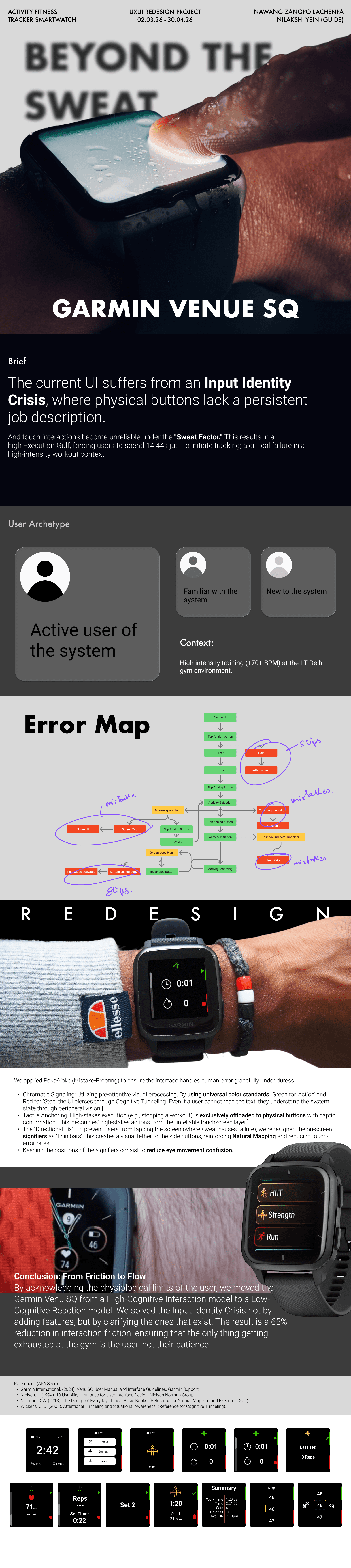
Overview
Mid-workout, a watch has one job: do the obvious thing on the first press. On the Venu Sq the two buttons change meaning from screen to screen, and the touchscreen stops listening the moment it gets wet. This project fixes the controls people already have instead of adding new ones.
| Role | UX research, interaction and UI design |
| Timeline | 8 weeks · 02 Mar — 30 Apr 2026 |
| Guide | Nilakshi Yein |
| Setting | IIT Delhi gym, HIIT and strength sessions |
| Device | Garmin Venu Sq · 1.3" touchscreen · 2 buttons |
as shipped
Action button
TOPBack / Menu button
BOTTOM1.3" LCD touchscreen, 240 × 240 px
Swipe, tap, double-tap to wake, swipe right = back
5 ATM — survives water, but water still fools the touch layer
Up to 6 days smartwatch, 14 h GPS
The same press means back on one screen and new set on the next. A button with no fixed job is a button people stop trusting. We called this the Input Identity Crisis.
Approach
We studied the watch where it fails: on a sweating wrist, between sets.
Contextual observation
IIT Delhi gym, during HIIT and strength sessions
Task walkthrough + timing
"Start a strength workout", wrist-raise to recording
Error mapping
Every press, hold and tap logged against the intended path
Heuristic evaluation
Nielsen's 10 heuristics applied to the activity flow
Literature review
Wet-touch interference, attentional tunneling, arousal and attention
Competitive teardown
Garmin 5-button watches, Apple Watch Ultra


map
Nine steps to start a set. Five ways to fail.
The original map, marked up by hand during sessions. Circles were drawn where people stalled or backtracked. The clean version above is the same data, reorganised so the failure clusters read at a glance.
Every red cluster sits next to either a button with two meanings or a touch target that stopped working. None of them came from a missing feature.
Insights
Archetypes
Trains 4–5 times a week, HIIT and strength. Wears the watch every session.
Has used Garmin or another watch before. Runs on muscle memory.
First smartwatch. Reads the screen to understand what it's doing.
map
The lowest points all sit in the first 15 seconds.
How might we let an athlete start a workout without reading or touching the screen?
How might we give each button one job that never changes, on any screen?
How might we make "recording" obvious in a half-second glance, and on the wrist?
Venu Sq users training at high intensity can't reliably start, track and stop a workout, because the buttons change meaning between screens and the touchscreen fails when wet.
principles
Four rules that make the interface handle human error gracefully.
Chromatic signaling
Green means act, red means stop: the most widely understood colour code there is. It reads in peripheral vision, so the state of the watch comes through even when the text doesn't.
Tactile anchoring
High-stakes actions such as stopping a workout move off the touchscreen and onto a physical button, confirmed with a buzz. What matters most no longer depends on dry fingers.
The directional fix
Thin bars on the screen edge sit exactly beside the button they belong to. They tether the on-screen meaning to the physical control, so nobody taps the glass looking for a button.
Fixed positions
Signifiers never move between screens. Same place, same colour, same job: the eye stops searching and the thumb stops guessing.
Colour never works alone. Every green and red is paired with a shape (▶ start, ■ stop, ✓ save, 🗑 discard), so the system still reads for people with red–green colour blindness.
flow
One direction per button, on every screen.
The original face: rings, complications and touch targets designed for a calm wrist.
One metric per row, three colours with meaning, and every action anchored to a physical button.
language
- Easterbrook, J. A. (1959). The effect of emotion on cue utilization and the organization of behavior. Psychological Review, 66(3), 183–201.
- Garmin International. (2024). Venu Sq user manual and interface guidelines. Garmin Support.
- Garmin Ltd. Venu Sq owner's manual: Device overview (buttons and touchscreen).
- Nielsen, J. (1994). 10 usability heuristics for user interface design. Nielsen Norman Group.
- Norman, D. A. (2013). The design of everyday things (Revised ed.). Basic Books.
- Tung, Y.-C., Goel, M., Zinda, I., & Wobbrock, J. O. (2018). RainCheck: Overcoming capacitive interference caused by rainwater on smartphones. Proc. ICMI '18. ACM.
- Wickens, C. D. (2005). Attentional tunneling and task management. International Symposium on Aviation Psychology.
- Apple Inc. Apple Watch Ultra user guide: Use the Action button.